
Keepsake memorial portraits
Memorial Portraits: A Dignified Keepsake From a Treasured Photo
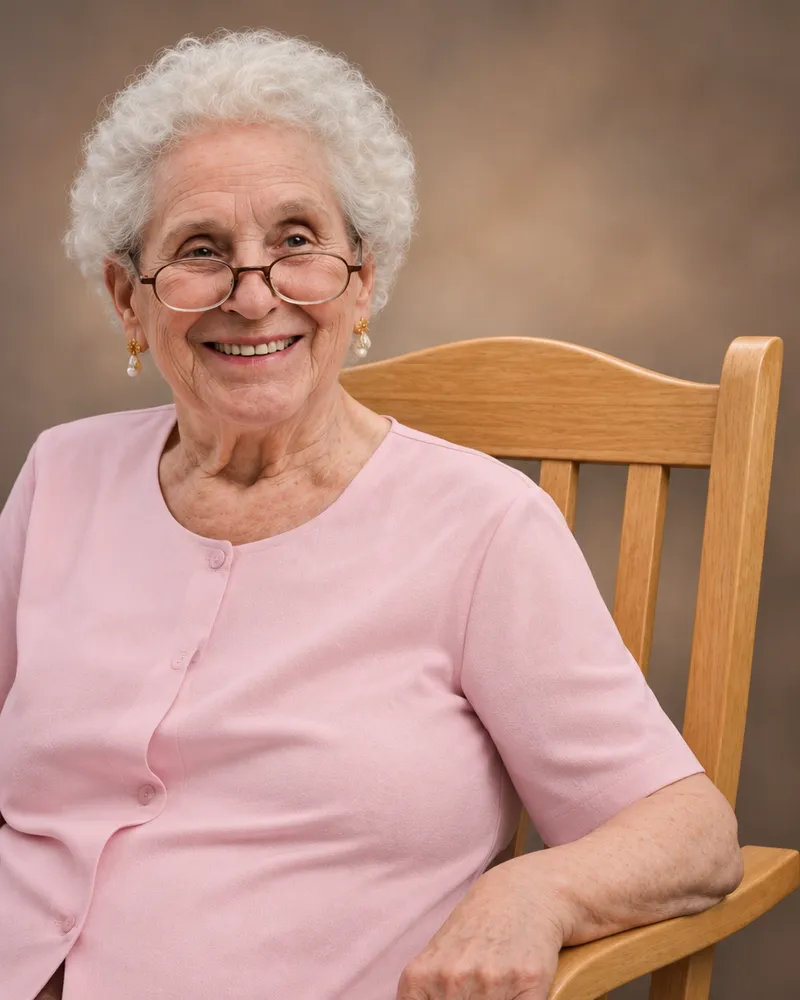
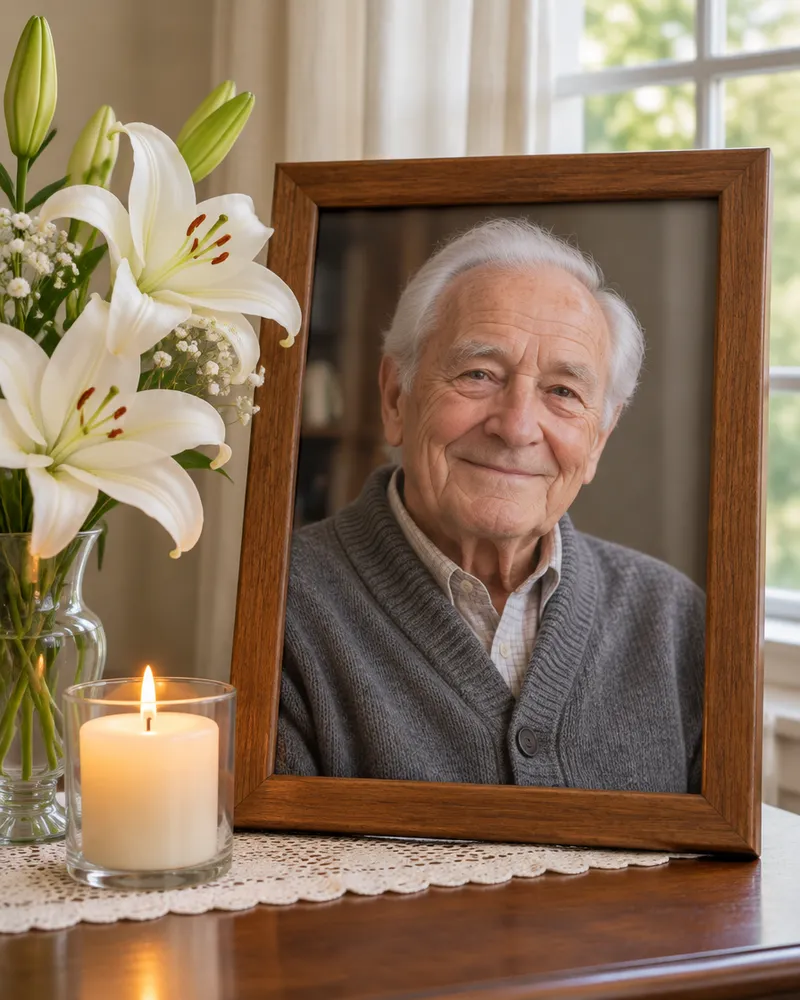
A memorial photo should look like the person you remember: the same face, the same age and the same expression, clear enough to frame. PhotoForPass gently restores one photo of your loved one, cleaning up scratches, noise and fading, and creates 4 calm keepsake portraits: Classic portrait, Peaceful garden, Soft sky and Timeless monochrome. The set costs $14.95, includes print-ready files and is ready within minutes.
Memorial portraits
$14.95- 4 portraits created from a cherished photo
- Print-ready files for frames and services
- Gentle, respectful styles
At a glance
- Price
- $14.95 for 4 keepsake portraits
- Styles
- Classic portrait, Peaceful garden, Soft sky, Timeless monochrome
- Files
- High-resolution, print-ready files
- Restoration
- Removes scratches, noise and fading
- What stays the same
- Face, age and expression from your photo
- Best print sizes
- 8x10 and 16x20 with no cropping
- Delivery
- Usually within minutes of payment
- Guarantee
- 3 free redos and a 14-day money-back guarantee
Key takeaways
- Four dignified portraits from one treasured photo, with print-ready files, for $14.95.
- Restoration cleans up scratches, noise and fading; the face, age and expression stay as they are in your photo.
- A memorial portrait honors how someone looked. It does not recreate anyone or bring anyone back.
- 8x10 prints match the portrait shape exactly, and 16x20 suits an easel at a service.
- Every result is checked for likeness, with 3 free redos and a 14-day money-back guarantee.
How it works
How to create a memorial portrait from a photo
-

Choose a clear photo
Pick a photo where your loved one's face is sharp, well lit and toward the camera, at the age the family wants to remember.
-
Prepare old prints
Scan prints at 300 dpi, or 400 to 600 dpi for small prints, or photograph them flat in daylight with the flash off. Crop group photos to one person.
-
Upload and pay $14.95
Upload the photo and pay once with Apple Pay, Google Pay, a card or Link. Your photo stays in your browser until you order.
-
Review and download
Within minutes, review the four portraits closely, ask for a redo if one does not feel right, then download the print-ready files.
What a memorial portrait is, and what it is not
A memorial portrait from PhotoForPass is a cleaned, gently restored version of a photo you already treasure, presented in a calm, dignified setting. It honors how your loved one looked in that photo.
We keep what makes the photo theirs. Their face, age, expression, hair and skin tone stay as they are in your picture. We do not make anyone look younger or older, add a smile that was not there, or change how they looked.
A portrait cannot bring anyone back, and we will never suggest it can. It is a keepsake: a clear, frame-worthy image for a service, for the home and for the years of remembering that follow. All four styles are non-religious by default, so they suit any faith, tradition or celebration of life.
Four keepsake portrait styles
Each order includes all four styles, one portrait in each. Two keep the focus on the person with a simple backdrop, and two add a soft, peaceful setting.
One way to use the set: frame the Classic portrait for the service and share the others with relatives. If the original photo is very faded or color-shifted, Timeless monochrome often looks the most natural.
| Style | What it looks like | Ideal for |
|---|---|---|
| Classic portrait | Gently restored portrait on a soft, warm gray backdrop with flattering studio light | Easel display at a service, obituary photo, program cover |
| Peaceful garden | A softly blurred garden with blooming white flowers and gentle morning light | A framed keepsake at home, the memorial table |
| Soft sky | Light clouds and warm, hopeful tones behind your loved one | Celebrations of life, keepsakes for family |
| Timeless monochrome | A restored, sharpened black and white tribute on a soft dark backdrop | Very faded or old prints, elegant frames, heirloom albums |
How to choose the best photo of your loved one
The best memorial photo is one where your loved one looks like themselves. Expression matters more than perfection, so start with photos the family already loves, then check them for clarity.
What to look for
- A clear, focused face. Sharp eyes matter more than a perfect background.
- Facing the camera. A slight angle is fine; profiles are harder to restore faithfully.
- Soft, even light. No deep shadows across the face and no squinting into the sun.
- The age you want to remember. We keep the age shown in the photo, so choose the stage of life the family wants to honor.
- Nothing covering the face. Sunglasses and hats that hide the eyes make likeness harder.
Using a group photo
Portraits keep the same people as your photo. For a portrait of one person, crop the photo on your phone so only your loved one remains, with their head, shoulders and a little space around them. If the face becomes small or blurry after cropping, try another photo. A photo of a couple, such as grandparents together, can stay as it is.
Scanned prints, faded and damaged photos
Old prints often hold the most meaningful photos. A careful copy of the print gives the restoration the most to work with.
Scanning a print
The Library of Congress suggests scanning normal prints at 300 dpi, and at 400 to 600 dpi for small prints you want to enlarge to 8x10 or more. Clean the scanner glass and take the photo out of its frame first.
No scanner? Use your phone
Lay the print flat near a window in daylight, out of direct sun. Hold the phone directly above it, parallel to the photo, and turn off the flash to avoid glare. Fill the frame with the print, then crop away the edges.
Faded and color-shifted photos
Restoration removes fading and noise. Colors on very faded prints come back looking natural, but they may not match the original exactly. Timeless monochrome is a good choice when most of the color is gone.
Scratches, creases and tears
Light scratches and creases are cleaned up. If a tear or stain crosses the face, the missing detail has to be rebuilt, and it may not look exactly like your loved one. Check each portrait closely before printing, and ask for a redo if something is not right.
Keep the original print safe after scanning: hold it by the edges, store it in a photo-safe sleeve in a cool, dry place, and never put tape on it.
Print sizes for services, frames and remembrance
Memorial portraits come as print-ready, high-resolution files in a 4:5 shape. That shape prints at 8x10 and 16x20 with no cropping; other sizes trim a little from the sides.
Ask the funeral home or venue what size its easels and frames take before you print. For a large print such as 16x20, check the pixel size on your download page and confirm with the print shop that it suits that size. CVS, Walgreens and Walmart photo counters often offer same-day pickup for standard sizes like 8x10; larger sizes can take longer.
| Use | Suggested size | Notes |
|---|---|---|
| Easel display at a service | 16x20 | Same shape as the portrait, no cropping. Check the pixel size first |
| Table frame or memorial table | 8x10 | Exact shape, the easiest size to print and frame |
| Frames for family members | 5x7 | Sides trimmed slightly, so keep the face centered |
| Album or small keepsake | 4x6 | Sides trimmed the most; best for head and shoulders portraits |
| Program, prayer card or slideshow | Use the image file | Place it in your program template or slideshow |
Using the portrait for a service, program or online memorial
A memorial portrait often appears in several places in the days around a service. One set of files covers them all.
- Funeral or memorial program: place the Classic portrait or Timeless monochrome on the cover of the program or order of service. Program templates and funeral homes accept standard image files.
- Easel and memorial table: a framed 16x20 or 8x10 print near the guest book helps guests feel welcome.
- Online obituary and social posts: the Classic portrait works well wherever a clean, simple image is needed.
- Slideshow or video tribute: use one portrait as the opening or closing image.
- Keepsakes for family: send the files to relatives far away so each household can print its own copy.
If the funeral home is designing the program, download the files and send them the one you choose.
Care, quality and privacy
We know these orders often come at a hard time, so every step is kept simple and gentle.
Every portrait is checked automatically before delivery: the same person as your photo, a natural face and clean details. If something looks off, it is redone automatically. You knew your loved one best, so if a portrait does not feel right, ask for a redo (3 free redos per order), or use our 14-day money-back guarantee.
Your photo stays in your browser until you order. After that, it is encrypted, used only to create your portraits, never sold or shared, and deleted automatically after 90 days, or sooner from My photos. Download and keep your own copies of the files. For other keepsake collections, visit the photo studio.
Full data safety
Your photo is safe with us, start to finish
A passport photo is personal. Here is exactly how we protect it.
-
Your photo stays on your device until you order
Checks and the preview run in your browser. Nothing is uploaded before you pay.
-
Encrypted in transit and at rest
After you order, your photo travels over a secure connection and is stored encrypted.
-
Automatically deleted after 90 days, or anytime you choose
Remove it yourself from My photos whenever you like. We never keep it longer.
-
Never sold, never shared for advertising
We use your photo only to make your document photo and send it to you.
FAQ
Frequently asked questions
What is a memorial portrait from PhotoForPass?
A memorial portrait is a gently restored keepsake made from a photo of your loved one. PhotoForPass cleans up scratches, noise and fading and presents the portrait in four calm styles: Classic portrait, Peaceful garden, Soft sky and Timeless monochrome. The set of 4 costs $14.95, includes print-ready files and is ready within minutes, for services, frames and remembrance at home.
How do I choose the best photo for a memorial portrait?
Choose a photo where your loved one looks like themselves and the face is sharp, evenly lit and turned toward the camera. Expression matters more than a perfect background. Because the portrait keeps the age shown in the photo, pick the stage of life the family wants to remember. Avoid sunglasses, deep shadows and photos where the face is very small.
Will the portrait change my loved one's age or expression?
No. Memorial portraits keep the face, age, expression, hair and skin tone shown in your photo. We do not make anyone look younger or older, add a smile or change their features. Restoration only cleans up the image, and each style changes the backdrop and the light. If any portrait does not look like your loved one, ask for a redo or a refund.
Can I use a scanned print for a memorial portrait?
Yes, scanned prints work well. The Library of Congress suggests 300 dpi for normal prints and 400 to 600 dpi for small prints you plan to enlarge to 8x10 or larger. Clean the scanner glass and take the photo out of its frame first. Without a scanner, photograph the print flat in daylight with your phone held parallel and the flash off.
Can you restore a faded or damaged photo?
Restoration removes fading, noise, light scratches and creases. Very faded colors come back looking natural but may not match the original exactly, so Timeless monochrome is a good choice when most color is gone. If a tear or stain crosses the face, missing detail has to be rebuilt and may not be fully faithful. Check each portrait closely and ask for a redo if needed.
Can I make a portrait of one person from a group photo?
Yes, crop it first. Memorial portraits keep the same people as the uploaded photo, so crop the picture on your phone until only your loved one remains, with head, shoulders and a little space around them. If the face becomes small or blurry after cropping, try a different photo. A photo of two people, such as grandparents together, can be used as it is.
What size photo is best for a memorial service?
A common choice is a 16x20 print on an easel and an 8x10 print in a table frame. Memorial portraits come in a 4:5 shape, so both sizes print without cropping. Ask the funeral home or venue what size its easels and frames take, and for 16x20, check the pixel size on your download page with your print shop. 5x7 prints work well as frames for family members.
How should I frame a memorial portrait?
An 8x10 print fits a standard 8x10 frame exactly, or an 11x14 frame with an 8x10 mat opening for a classic, finished look. Simple black, white or wood frames keep attention on the face. For a service, a 16x20 print mounted on foam board or framed on an easel is easy to see across a room. Keep framed prints out of direct sunlight to slow fading.
Can I use the portrait in a funeral program?
Yes. The print-ready files work in funeral and memorial programs, orders of service, prayer cards and slideshows. Place the Classic portrait or Timeless monochrome on the program cover in your template, or send the file to the funeral home that is designing it. Because the files are high resolution, they stay sharp at the small sizes used on programs and cards.
How quickly can I get a memorial portrait for a service?
Memorial portraits are usually ready within a few minutes of payment, so you can order on the day you need them. CVS, Walgreens and Walmart photo counters often offer same-day pickup for standard sizes like 8x10; check the store's app for times. Large prints such as 16x20 can take longer, so order those as early as you can.
Will a black and white photo stay black and white?
The Timeless monochrome portrait is always black and white, so it keeps the look of an old print. The other three styles are made in soft, natural tones, so a black and white original may come back with gentle color. Review all four portraits and choose the one that feels most true to your memory. If one does not feel right, ask for a redo.
Do memorial portraits include religious symbols?
No. All four memorial portrait styles are non-religious by default, with a neutral backdrop, a peaceful garden or a soft sky. That makes them suitable for any faith, tradition or celebration of life. If you want a verse, a symbol or a name with dates, add it in your program, on the frame mat or in a card design around the portrait.
Can I order a memorial portrait as a sympathy gift?
Yes, with care. A restored portrait can be a meaningful sympathy gift, but check with the close family first, since they may have a favorite photo or prefer another. Use a photo they are comfortable sharing, then send them the files or a framed 8x10 print. The 14-day money-back guarantee applies if the portrait does not feel right.
Is my loved one's photo kept private?
Yes. Your photo stays in your browser until you order. After that, it is encrypted in transit and at rest, used only to create your portraits, never sold, never shared for advertising and never used to train AI. It is deleted automatically after 90 days, and you can delete it sooner from My photos. Download and keep your own copies of the files.
What if the portrait does not look like my loved one?
You knew them best, so trust that feeling. Ask for a redo, since every order includes 3 free redos. a sharper or larger photo of the face often helps. If you are still not satisfied, email contact@photoforpass.com within 14 days of purchase with your order number for a full refund, no questions asked.
Related
- Photo studio Custom portraits created from your photo
- Family album portraits Studio-style portraits from everyday photos
- Photo greeting cards Your photo on a card for any occasion
- Couple portraits Portraits of the two of you
- Pricing Packages and what each includes
- FAQ Answers to common questions
- How it works From selfie to compliant photo
Official sources
We check these pages when the rules change. Last updated Nov 8, 2026.
Ready when you are
Create a dignified keepsake portrait
Upload a treasured photo, pay $14.95 once and receive 4 restored portraits with print-ready files in minutes. 14-day money-back guarantee.
- 14-day money-back guarantee
- Photo stays on your device until you pay
- Checked against official rules